



IBM ILMT Services
This service is for organizations that license IBM software at subcapacity.
Make sure your subcapacity licensing position stays protected.
If there are gaps in your ILMT coverage, reporting, or software bundling, your subcapacity eligibility could be at risk. This might mean you have to pay for full-capacity licensing costs.
MetrixData 360 reviews your IBM License Metric Tool (ILMT) deployment coverage, reporting evidence, and software bundling. We help you find and fix any gaps in your licensing position.
Where exposure can hide
- Missing audit reports
- Incomplete deployment coverage
- Incorrect software bundling
Let us know about your setup and any concerns you have. We can talk about what needs more attention and see if MD360 is a good fit for you.
What’s at stake
If ILMT is misconfigured or not set up, this could lead to an audit finding or financial exposure that costs your company six or even seven figures.
You planned your budget to license only the virtual capacity running your IBM software. However, if ILMT is missing, set up incorrectly, or lacks the right reporting evidence, you might face a full-capacity licensing claim during an IBM audit.
This means you would have to license the entire physical capacity, not just the virtual capacity your software uses. The resulting audit finding could reach six or seven figures, or even more, depending on your setup and licensing terms.
Just having ILMT installed is not enough. Does it actually cover all your IBM deployments, and do you have the reporting evidence to back up the subcapacity position you are relying on?
A real-world example
Same workload.
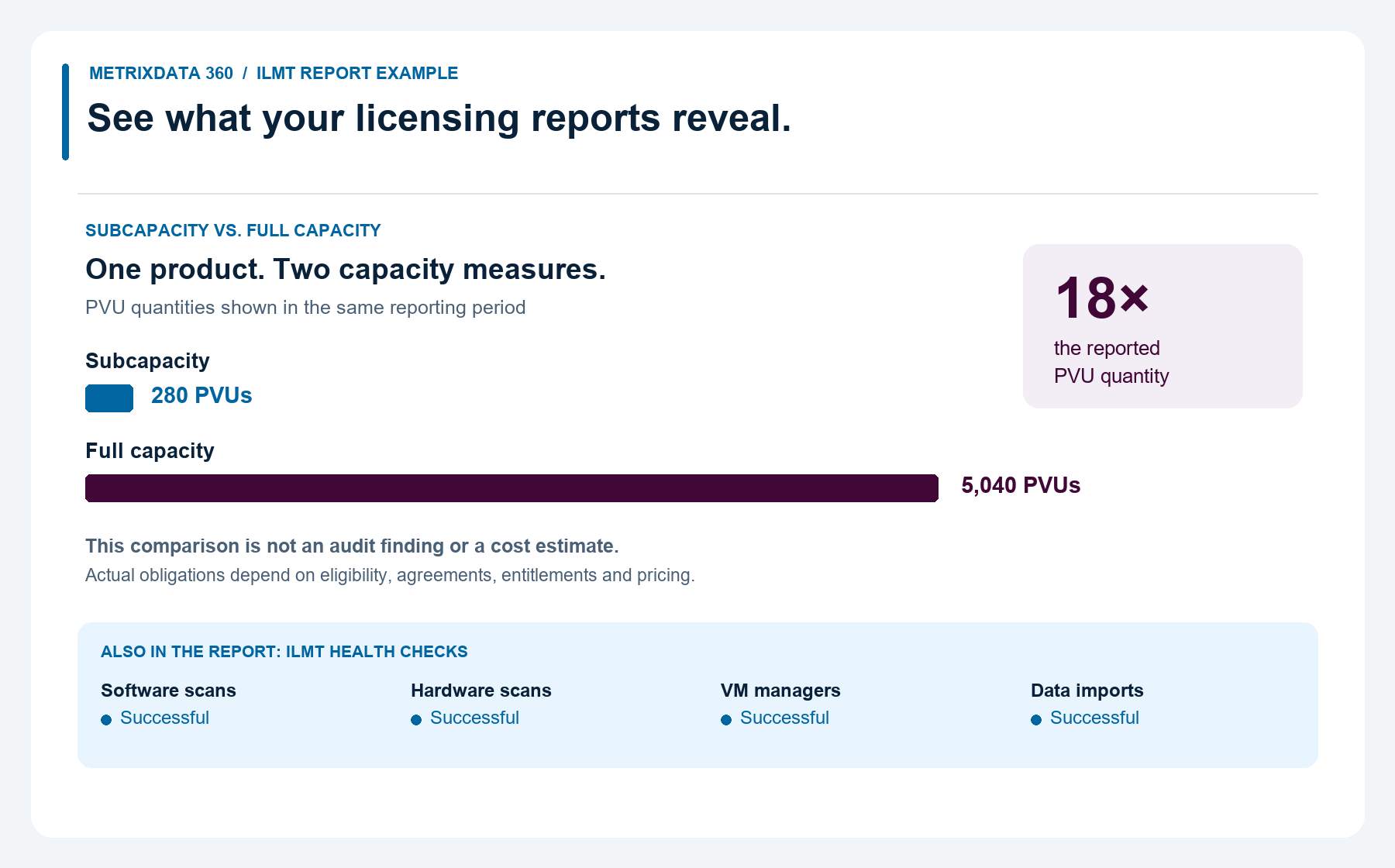
18 times the PVU requirement at full capacity.
280 PVUs at subcapacity
5,040 PVUs at full capacity
In this real-world ILMT report, one product shows a subcapacity requirement of 280 PVUs and a full-capacity requirement of 5,040 PVUs—18 times as much for the same workload.
Maintaining the required coverage and reporting evidence helps support the subcapacity position your budget relies on.
The 18× difference is in the PVU requirement. Actual licensing costs depend on your agreements, eligibility, entitlements, and pricing.
See how ILMT reporting can help you avoid unnecessary licensing costs.
In this example, the subcapacity requirement is 280 PVUs, compared with 5,040 PVUs at full capacity—18 times as much. Without ILMT or an approved alternative meeting the applicable reporting requirements, you could face a full-capacity licensing claim, even though your workload hasn’t changed.
Accurate reporting helps support your subcapacity position, so your licensing reflects the virtual capacity your software uses.
How MD360 helps
Find and fix gaps in your ILMT setup before they become costly problems.
Understand where your ILMT position needs attention—and what to do next.
We review your deployment coverage, reporting evidence, and software classification. You receive clear findings and recommended actions. The scope is agreed on before work begins.
01 / COVERAGE
Find the deployments your reports could be missing.
We review your existing ILMT setup against your IBM footprint to identify gaps in scanning, configuration and virtualization data.
After that, we help you fix coverage issues and make sure your reports measure what they should.
02 / EVIDENCE
Know which reporting periods you can substantiate.
We check your saved audit snapshots, find any missing or incomplete periods, and help set up who will create, check, and keep future reports.
IBM requires quarterly audit snapshots retained for at least two years. See IBM’s reporting guidance.
03 / CLASSIFICATION
Check the license count against the rights you own.
We check your component assignments, bundles, and exclusions against your entitlements and license terms.
This review helps you tell the difference between a reporting mistake and a real license shortfall that needs a deployment or purchase decision. See IBM’s classification guidance.
Already have ILMT running? Book a call about your current setup.
Client case study · Healthcare technology
How ILMT reporting helped a healthcare technology provider save close to $500K.
FROM REPORTING TO SAVINGS
A healthcare technology provider needed a clearer view of its IBM licensing. We used ILMT reporting to assess compliance and find opportunities to reduce costs.
Two changes that reduced licensing costs.
Reconfigured instances
Reduced the number of vCPUs or CPUs requiring subcapacity licensing.
Changed licensing models
Moved suitable software from subcapacity to named-user licensing to reduce costs.
THE RESULT
Nearly$500Kin savings
By making changes to configuration and licensing, ILMT reporting insights led to real savings.
“Without MetrixData 360, we would never have found this until it was too late.”
— Director of Infrastructure
Healthcare technology provider
Are there ways your ILMT reports could help you lower licensing costs? Schedule a call to find out.
Why work with MD360?
Experienced ILMT specialists. Practical licensing advice.
Our ILMT services are backed by specialists with over 10 years of hands-on experience. We combine that technical expertise with MD360’s IBM licensing and audit support experience to help you understand your licensing position and make informed decisions.
Generating reports is only part of the job. Understanding what they mean and what to do next helps you address licensing gaps, prepare for scrutiny, and find opportunities to reduce costs.
Experience that connects the technical details to business decisions.
We review your ILMT reporting alongside your deployments, entitlements, and licensing terms. We explain what needs attention, your options, and how those choices could affect your costs.
What happens when you book a call?
Talk through your IBM licensing concerns and identify the next step.
Tell us about your current setup and what prompted you to reach out. It could be an IBM audit, missing reports, uncertainty about ILMT, or a concern that you’re paying too much.
We’ll discuss what needs a closer look and whether MD360 can help with a review, remediation, or ongoing support. If it’s a fit, we’ll agree on the scope before detailed work begins.
You don’t need a complete technical inventory to start. If IBM has contacted you, have the request and any response deadline handy.
Frequently asked questions
IBM ILMT services: your questions answered.
Does installing ILMT make us compliant?
Just installing ILMT is not enough. Your tools must be set up correctly, measure the right deployments, classify software, and keep the required reports. Product and technology eligibility are also important. The key is whether your setup and evidence meet the rules.
What if reports are missing or incomplete?
First, find out what is missing, which periods are affected, and what data you still have. A new report does not always fix an old evidence gap. We can talk about the issue and how we can help you investigate and resolve it.
Can incorrect bundling affect our license position?
Yes. Component assignments affect which products and quantities are reported. Bundling and exclusions must match your license documents. An error can change your position, but not every bundling mistake removes all subcapacity eligibility.
We have received an IBM audit request. Can we still talk?
Yes. Let us know what IBM has asked for, any response deadlines, and your main concerns. We can talk about ILMT and audit support.
Do you help if we have not deployed ILMT yet?
Yes. We can help with installation and setup. The goal is to set up the coverage, configuration, and reporting you need for your licensing. Installing now does not automatically fix past issues.
Is ILMT the only tool IBM permits?
No. IBM accepts certain approved alternatives for subcapacity reporting, including specified Flexera One offerings and validated versions of HCL BigFix Inventory. Approval depends on the product, version, environment, and applicable terms.
ServiceNow SAM Pro can integrate with ILMT or BigFix data; that integration is different from replacing the approved metering tool. Let us know what you use so we can review the requirements for your setup.
Do you provide ongoing ILMT management?
Yes. Our ongoing services include regular reporting, quarterly health checks, and help with coverage and licensing issues. We agree on responsibilities and scope, including how to handle changes and follow up on any gaps.
What does the service cost?
The scope depends on your environment and whether you need setup, specific fixes, or ongoing support. Contact us to talk about the work and pricing.
Choose a time to talk
Not sure if your ILMT evidence will hold up under review?
Let’s talk about what you have now, what you need to check, and the decision you face. We’ll discuss how MD360 can help you move forward.
Already responding to IBM? Bring the request and response date to the conversation.
Book a call.
Pick a time on our booking page. To make the conversation useful, be ready to talk about these:
- Whether ILMT is installed.
- What concerns do you have?
- Whether you have an IBM request or a deadline.
Or call 1.888.978.5129.
IBM requirements and further reading
Requirements depend on your applicable agreements, products and environment. This page does not guarantee compliance or an audit outcome.
- IBM licensing tools guide — configuration, reporting and full-capacity consequences.
- IBM reporting guidance — classification and retained snapshots.
- IBM subcapacity requirements — eligible products, technologies and approved tools.
- MD360: IBM ILMT explained — background reading.