

Optimization Begins With Data That Can Withstand Scrutiny.

Written by Sharon Idaraji, SAM Specialist/Consultant at MetrixData 360.

When I step into an Enterprise License Program optimization, I start by examining the quality of the data. Before we discuss modeled reductions or projected savings, I want to understand coverage, gaps, and how technical deployments align with contractual definitions. In complex licensing environments, data quality determines whether any optimization effort will hold up under scrutiny.

Over the past several months, I have focused heavily on validating foundations that organizations assumed were already reliable. I reviewed deployment coverage, reconciled metric definitions, investigated anomalies, and challenged records that teams had accepted without verification. This work rarely feels strategic, yet it consistently changes negotiation outcomes.

Most enterprises do not lack analysis. They lack validated alignment between analysis and contractual reality.


Running Analysis Does Not Equal Readiness

Internal teams often complete usage reviews and model reduction scenarios well before renewal. From their perspective, optimization is already underway. The gap only becomes visible when two direct questions surface: What percentage of the estate relies on verified, current data? And would that data withstand formal audit-level scrutiny?

Running reports does not create defensibility. In licensing programs, coverage drives credibility. If portions of the estate rely on assumptions, if virtualization mapping lacks precision, or if teams have not interpreted contractual exceptions carefully, the optimization model rests on unstable ground.

I recently worked with an organization that believed it had secured a strong negotiating position ahead of renewal. Their team had modeled reductions and identified cost improvements. When we reviewed the underlying dataset, we found blind spots in virtualization reporting, inconsistencies between deployment data and license metrics, and unresolved anomalies that would have raised serious questions during review.

Internally, leadership saw optimization. Under structured examination, exposure remained.


Evidence Standards Change the Conversation

Internal reporting serves operational clarity. Publisher scrutiny serves contractual validation. These two standards do not always align.

Virtualized environments, hybrid architectures, and layered entitlements introduce complexity that dashboards alone cannot resolve. When negotiations begin, assumptions quickly turn into evidence requests. If the supporting data lacks alignment, confidence erodes at the table.

Many advisors emphasize projected savings. We emphasize survivability.

Projected reductions carry little value if they collapse under evidence review. Organizations gain more leverage from positions that remain stable when challenged than from aggressive assumptions that create downstream risk.


Timing Must Reflect Structural Complexity

Many organizations begin renewal preparation based on calendar deadlines. In straightforward licensing environments, that approach may work. In layered, multi-metric environments, structural complexity should dictate timing.

Mixed metrics, virtualization rules, and historical amendments require careful review. When teams compress preparation into narrow windows, they rely on interpretations that they have not fully validated. Pressure encourages optimism. Optimism weakens defensibility.

In a recent engagement, the environment had evolved significantly since the last internal review. Workloads had shifted, licensing models had changed, and new deployment patterns had emerged. Rather than reuse prior analysis, we rebuilt the model using current-state data. We revalidated anomalies and tested metric alignment against contractual language.

That decision slowed the process slightly. It strengthened the position materially.


Restraint Protects Leverage

Visible cost reductions attract attention. Defensible reductions protect organizations.

Less experienced advisors often push aggressively for optimization because the financial delta appears compelling. However, small interpretive gaps in deployment data or contract language can expand quickly once scrutiny begins.

Virtual desktop and hybrid deployment models illustrate this clearly. The technical configuration may appear straightforward, yet licensing implications depend on user qualification, device classification, hosting location, and access rights. When teams conflate those elements, they unintentionally introduce exposure.

These risks surface during audits and renewals, not during dashboard reviews.

When data coverage is complete and contractual interpretation aligns with deployment reality, negotiations shift. Teams present structured evidence rather than defend assumptions. Scope narrows. False exposure signals disappear before they gain leverage.


Financial Impact Follows Structural Discipline

In the recent engagement, the outcome followed a disciplined sequence.

  • First, we reduced risk by eliminating exposure signals created by incomplete or outdated data.
  • Second, we preserved leverage by aligning deployments precisely to entitlement structures and validating contractual exceptions.
  • Third, we strengthened governance by establishing a refresh cadence that reflects how quickly the environment evolves.

Financial alignment followed naturally. It emerged as a consequence of validated positioning rather than aggressive reduction targets.

Enterprises should measure optimization success by one standard: does the position hold when challenged?

If a projected reduction cannot withstand scrutiny, it introduces deferred risk. If the data foundation remains incomplete, leverage remains fragile. Enterprises do not need additional dashboards. They need defensible positions built on verified, current data that aligns with contractual reality.

That is where Enterprise License Program optimization becomes sustainable rather than performative.


Why Identity Governance Determines Microsoft Licensing Outcomes.

Written by Gabe Vos, Software Asset Management (SAM) Specialist at MetrixData 360.

When we’re asked to review Microsoft 365 licenses, the request usually sounds straightforward: look at usage, group users, and recommend cheaper licenses where appropriate.

On the surface, that’s exactly what we did. However, over time, this kind of work has made something very clear to me. Microsoft licensing optimization rarely breaks at renewal. It breaks much earlier—on the day users are created. Licenses don’t drift on their own. Identity does.


The Assumption That Creates Risk

Most organizations believe that once usage data is available, licensing decisions become obvious. If a user isn’t using advanced tools, they shouldn’t have an expensive license. If they only need basic access, they should be on a lighter plan.

That logic makes sense. It’s also where optimization quietly becomes fragile.

Usage data shows activity. It does not clearly show who the user is, why the account exists, how long it should exist, or what worker type it represents. Microsoft licensing depends on those answers more than most teams realize. Without identity discipline, usage becomes an incomplete signal.


What the Data Showed

In this engagement, we profiled users based on real usage and grouped them accordingly. Two patterns stood out immediately.

First, we found store-level accounts assigned Microsoft 365 E5. These accounts were never intended for full knowledge work. Their behavior confirmed that. Based on role and usage, Microsoft 365 F3 with F5 Security and Compliance provided the right fit. Security posture remained strong, but the license finally matched the job.

Second, we identified a large group of users on Microsoft 365 F3 plus Entra ID P2. During workshops, we learned these users only required single sign-on for third-party systems. Usage data confirmed it. Microsoft 365 F1 with Entra ID P2 aligned better with their real purpose.

The recommendations themselves were not controversial. Applying them safely was.


Where Governance Broke Down

As we moved from analysis to execution, a deeper issue surfaced. The organization had no consistent way to identify users.

The same worker groups appeared under different naming conventions. Job titles varied widely. Worker types were not enforced. Some users entered through one onboarding system. Others entered through another. Temporary workers were added in bulk with minimal classification.

There was no single, trusted user profile that clearly answered:

  • Who is this person?
  • What role do they perform?
  • What access model applies to them?
  • What lifecycle rules govern their account?

This is where Microsoft licensing optimization becomes a governance problem. When identity is inconsistent, every licensing review becomes a manual interpretation exercise. And manual interpretation does not scale.


The Decision That Protected the Client

It would have been easy to push forward anyway. A less experienced advisor might have relied strictly on usage data, forced the license changes, and presented a strong savings figure. On paper, the numbers would look compelling. However, numbers without identity clarity create new risk.

When user classification is unclear, license adjustments become difficult to defend. Audits grow more complex. Exceptions multiply. Procurement loses confidence in the optimization model. IT revisits the same cleanup exercise the following year.

We chose not to optimize past what the organization could govern. Instead, we treated Microsoft licensing as an identity and lifecycle discipline first, and a cost exercise second. We slowed down where needed. We focused on stabilizing user classification before pushing aggressive reductions. That judgment preserved control.


Why Identity Governance Drives Renewal Leverage

Microsoft licensing is not forgiving. Audits rely on evidence, not intent. License plans assume defined use cases. Renewal negotiations assume predictable classification.

When identity data is inconsistent, even correct decisions appear arbitrary. That weakens leverage during renewal discussions. It also erodes executive trust in savings projections.

Strong Microsoft licensing optimization follows a clear order:

  1. Reduce risk
  2. Preserve leverage
  3. Strengthen governance
  4. Then realize savings

When organizations reverse that order, savings often return and risk increases. CFOs see unpredictable variance. Procurement sees weak negotiation footing. CIOs inherit recurring cleanups instead of structural control.


The Bigger Lesson: Licensing Reflects Identity Maturity

The deeper takeaway here has little to do with specific SKUs. It has everything to do with identity governance.

If onboarding is not standardized, license optimization becomes a one-time cleanup instead of a repeatable system. Without enforced worker types, role clarity, and lifecycle rules, every review starts from zero. In contrast, organizations that invest in identity discipline experience something different.

  • Licensing decisions become predictable.
  • Audit conversations become structured.
  • Renewals become more controlled.

Optimization stops being reactive and becomes embedded in governance.


A Governance-First View of Microsoft Licensing Optimization

This is why at MetrixData 360, we focus on defensibility before savings.

Usage analysis is necessary. SKU alignment matters. However, sustainable Microsoft licensing optimization depends on something more foundational: clear identity structure and lifecycle control.

Tools support this process. Judgment enforces it. When user identity is stable, optimization becomes routine. When identity is inconsistent, optimization becomes risky.

That distinction determines whether savings happen once or become repeatable. And in Microsoft environments, repeatability is what creates long-term control.

Microsoft Licensing Optimization Fails When Contracts Are Treated as Truth.

Written by Gary Arseneau, Project Delivery Specialist at MetrixData 360.

Microsoft licensing optimization often appears complete long before it is tested. Enterprises sign agreements, activate tenants, and keep paying invoices. From that view, the environment looks compliant. Leadership sees spend, assumes control, and moves on. However, that assumption introduces more licensing risk than most technical gaps.

In reality, Microsoft does not test contracts. Microsoft tests behavior. When Microsoft audits, renewals, or true-ups begin, operational evidence matters far more than what the agreement says.


Why consolidation rarely simplifies Microsoft licensing optimization

Many organizations expect Microsoft licensing optimization to improve after consolidation. One agreement ends. Another begins. Over time, the environment should stabilize.

That expectation feels logical. In practice, Microsoft environments retain history. Licensing decisions made during acquisitions, urgent purchases, or tactical renewals tend to persist. As a result, overlapping entitlements form quietly. Ownership blurs. Exposure grows without visibility.


Contracts do not optimize Microsoft environments

Microsoft licensing optimization does not happen automatically. Contracts do not retire cleanly. Entitlements do not unwind when business needs change. Licenses purchased under different buying motions often remain active at the same time.

Individually, each path looks valid. Collectively, they create fragility. Over time, spend continues while confidence rises. Meanwhile, risk accumulates out of view.


When licensing data contradicts internal assumptions

In one post-acquisition environment, licensing data challenged leadership’s understanding.

The organization had ended a prior Enterprise Agreement years earlier. Yet Microsoft systems still treated parts of that agreement as active. At the same time, the business purchased licenses through a CSP model to support growth. From the customer’s perspective, the approach solved an immediate problem. From Microsoft’s perspective, it created overlapping entitlements without reconciliation. Consequently, duplicated exposure appeared without operational benefit.

This is how Microsoft licensing optimization fails quietly.


Tenant-level tracking increases audit exposure

The duplication alone did not create the highest risk. Tracking methods did.

Instead of assigning licenses clearly at the user level, the organization monitored usage at the tenant level. While this works operationally, it fails under audit conditions. Microsoft does not adjust evidence standards to match internal tracking preferences. If usage intent and entitlement proof do not align, Microsoft assumes risk. At that point, negotiation leverage disappears.


Why aggressive Microsoft licensing optimization backfires

At this stage, many advisors push for rapid optimization. They remove licenses, collapse SKUs, and highlight short-term savings. On paper, results improve. In practice, new risk replaces old risk.

Without understanding service accounts, inherited configurations, or legacy naming conventions, aggressive cuts remove critical evidence. Later, when Microsoft requests justification, the organization cannot explain what changed or why. Dashboards improve. Spend drops. Defensibility weakens.


Judgment matters more than tools

In this engagement, restraint mattered more than speed.

Instead of forcing a textbook allocation model, the team evaluated how the environment actually operated. Future needs guided decisions, not just immediate cleanup.

The key question was simple: Which Microsoft licensing optimization decisions will still hold up six months from now?

Context mattered more than symmetry. Judgment mattered more than tooling.


Optimization without intent creates exposure

Microsoft pressure rarely comes with advance warning. Audits, renewals, and true-ups arrive framed as routine. In reality, Microsoft controls interpretation, evidence standards, and historical context.

An environment that looks optimized but lacks a clear usage story carries more risk than one with measured excess and strong justification. Therefore, Microsoft licensing optimization without intent becomes cosmetic. Savings without explanation do not last.


A safer sequence for Microsoft licensing optimization

This engagement followed a deliberate order.

  • First, the team reduced risk by isolating duplicated entitlements before external review.
  • Next, the organization preserved renewal leverage by documenting how licenses supported real operations.
  • Finally, leadership clarified governance rules tied to future growth and roadmap decisions.

Only then did financial optimization enter the discussion. At that point, every change had a defensible rationale.


What sustainable Microsoft licensing optimization requires

Microsoft licensing optimization is not an accounting exercise. It is an operating discipline.

It assumes scrutiny. It anticipates Microsoft behavior. Most importantly, it prioritizes defensibility over speed.

At MetrixData 360, this discipline shapes how environments are assessed, how decisions are sequenced, and how outcomes are measured. Tools support the process, but judgment drives it. One-time savings are easy to create. Repeatable, defensible Microsoft licensing optimization is not. That is the standard enterprises should expect when their licensing position is eventually tested. Connect with our team to ensure you are fully protected from Microsoft licensing optimization fails.

Adobe Licensing Risk Is No Longer Static

Adobe licensing risk is no longer static. High-water mark usage changes the cost and audit exposure model.

Adobe environments rarely fail loudly. They drift quietly.  If your Adobe licensing posture is based on a point-in-time snapshot, you’re operating with an outdated risk model. 

What changed? 

Adobe risk is increasingly influenced by usage over time, not just “what’s assigned today.” That includes peak (high-water mark) usage during a contract period, which can create long-term financial exposure even if usage later declines. 

What is high-water mark usage in Adobe? 

High-water mark usage is your peak consumption level during a period. Even if usage drops later, that peak can shape renewal baselines, reconciliation conversations, and true-up exposure. 

Why it matters:

  • Temporary project spikes can become long-term cost baselines 
  • Short-term contractor access can create lasting exposure 
  • Usage declines don’t always restore leverage 

The risk is no longer where usage ends the year. It’s where usage peaks.

Where Adobe cost and audit exposure typically hides: most Adobe exposure comes from structural blind spots, not “complex products.” 

1) Named-user drift 

  • Licenses assigned to inactive users 
  • Contractors retaining access 
  • Role changes not reflected in license profiles 

Result: inflated baselines and weak defensibility. 

2) Acrobat and Adobe Sign shadow spend 

  • Department-led purchases outside central visibility 
  • Multiple agreements for the same capability 
  • Overlapping entitlements 

Result: fragmented spend and reduced negotiating power. 

3) Program and contract misalignment (VIP vs ETLA) 

  • Enterprise-scale usage managed through short-term programs 
  • Volume thresholds crossed without renegotiation 
  • Pricing locked before usage validation 

Result: structurally weaker commercial position. 

4) Global and remote usage ambiguity 

  • Multi-geo access and inconsistent local assumptions 
  • Shared devices across regions or functions 

Result: compliance ambiguity (usually resolved in the vendor’s favor). 

5) Renewal timing that eliminates leverage 

  • Reviews start after budgets are set 
  • Renewals treated as routine events 
  • Last year’s mistakes rolled forward 

Result: reactive negotiation framed around vendor data. 

Why don’t admin tools equal control? Adobe Admin Console shows administration and activity. It does not provide defensibility. It typically won’t: 

  • reconcile contracts to real usage 
  • quantify exposure from usage spikes 
  • translate activity into audit-grade risk posture 

Visibility is not control. Control requires validation and context. 

Adobe’s view vs your reality (why negotiations go sideways) 

Adobe’s view 
Enterprise reality 
Contracted entitlements 
Operational access 
Assigned licenses 
Actual user behavior 
Subscription counts 
Temporal usage patterns 
Compliance assumptions 
Data gaps and exceptions 

If you negotiate or respond to audits without independent validation, you’re operating inside Adobe’s version of the environment. 

A simple control model for Adobe licensing. 

Mature organizations treat Adobe as a continuous discipline, not an annual event: 

  1. Establish a clean baseline 
  2. Validate identity, usage, and contracts 
  3. Correct misalignment early 
  4. Govern forward so exposure doesn’t re-accumulate 

When to reassess your Adobe position 

Reassess if any apply: 

  • renewal in the next 6–9 months 
  • Acrobat or Adobe Sign expanding 
  • recent M&A or major org change 
  • audit correspondence or self-assessment requests 
  • Finance can’t explain Adobe spend drivers with confidence 

Delay reduces options. Early visibility creates leverage. 


Next step: If you want the executive version of this analysis: Download The Adobe Cost & Audit Exposure Map to learn where enterprises overpay, lose leverage, and get audited — and how to regain control. 


FAQ  

What is named-user drift in Adobe? 

Named-user drift is when Adobe licenses remain assigned to users who no longer need them (inactive users, contractors, role changes). It inflates baselines and weakens audit defensibility. 

Why is Adobe high-water mark usage a risk? 

Because temporary spikes can become long-term exposure. Even if usage later drops, peak usage may influence reconciliation, true-ups, or renewal positioning. 

Why can’t we rely on Adobe Admin Console data? 

Admin tools show activity but don’t reconcile contracts, interpret entitlement risk, or quantify exposure from usage behavior over time. 

When should we start Adobe renewal planning? 

Ideally 6–9 months before renewal to validate usage, correct misalignment, and avoid negotiating off vendor narratives. 

What’s the best first step to reduce Adobe audit exposure? 

Start with a validated baseline: what you own, what’s assigned, what’s used, and where peaks or anomalies create exposure. 

How to Budget For a Microsoft EA Renewal When Microsoft Won’t Share Discount Guidance

If you need board-ready numbers before Microsoft that will give you discount clarity, you have to build your budget from your own defensible baseline, not Microsoft’s proposal. The most reliable way to do this is to break Microsoft into four negotiations (EA, Azure, Unified Support, Dynamics), validate what you need, and model the renewal from the bottom up. 

Why this keeps happening 

Microsoft has structurally reset pricing in its favor. Even when organizations “renew what they have,” many are seeing immediate 20–40% increases once you combine pricing resets, discount compression, and cumulative product price changes over the last few years. 

Microsoft isn’t optimizing for your budget cycle either. They optimize for internal approval logic and metrics such as revenue per user, usage adoption, and strategic product attachment. Those incentives rarely align with how finance, procurement, or boards need to plan. 

The most common mistake: budgeting from Microsoft’s proposal 

Most organizations start negotiations from Microsoft’s first proposal, which typically includes: 

  • The current contract, re-priced 
  • “Strategic” add-ons (Copilot is the most common) 
  • Assumptions gathered from different parts of the organization 

The renewal then becomes an exercise in removing items, arguing discount, and signing late. That’s how a $2M renewal becomes a $2.7M “win” and still feels like a loss. 

The fix: build your baseline first 

If you want predictable budgeting, you need to build your baseline before Microsoft anchors the renewal. The minimum dataset usually includes: 

  • What you bought (entitlements, agreements, amendments) 
  • What’s assigned and actually used (by service, not just license counts) 
  • What’s deployed for infrastructure licensing (Windows, SQL, and related attributes) 
  • What’s on the roadmap (even if the roadmap is “we don’t know yet”) 

From that baseline, you model scenarios: 

  • Keep EA vs shift to CSP (or another program) 
  • E5 everywhere vs role-based profiles (E3 plus add-ons where justified) 
  • Unified Support priced off last-year spend vs a future-state lower spend 
  • Dynamics growth vs status quo vs procurement-driven uncertainty 

This is where data quality matters. If usage, assignment, or inventory data isn’t reliable, the model collapses, and Microsoft regains control of the narrative. 

Why Microsoft feels like “different worlds.” 

Most customers view Microsoft as a single vendor. In practice, Microsoft operates as multiple negotiating engines: 

  • EA: core suite and enterprise online subscriptions 
  • Azure: consumption and commitments 
  • Unified Support: priced on spend, with separate value and renewal dynamics 
  • Dynamics: separate team, separate agenda, often separate pricing behavior 

If you don’t coordinate these as a single strategy, Microsoft will manage them independently — and optimize each in their favor. 

Volume floors: what you can and can’t reduce 

Two rules matter: 

  • Additional Online Subscriptions (often Dynamics, Power BI, Project, Visio, Copilot add-ons) are typically reducible on anniversary with notice. 
  • Enterprise Online Subscriptions (often M365 suites) may have a contractual “floor” tied to the initial commitment. 

In practice, Microsoft sometimes allows reductions below the floor. Sometimes they don’t. You can’t rely on informal flexibility as a strategy. 

The defensible approach is to: 

  • Plan baseline volume conservatively 
  • Design downgrade paths (not just volume reductions) 
  • Avoid amendments that remove your ability to reduce 

Copilot and amendment lock-in risk 

Copilot is often positioned as “we’ll help with pricing if you commit.” The risk isn’t Copilot itself; it’s the amendment language. 

We regularly see organizations commit to large add-on volumes for “discount reasons” and pay for years while adoption stays minimal. If the discount is funded by lock-in, it’s not a discount. It’s prepaid shelfware. 

What a realistic EA renewal timeline looks like 

Most successful EA renewals are worked 9–12 months in advance. That window allows you to control the narrative, build defensible data, and avoid last-minute concessions. 

A typical timeline looks like: 

  • 9–12 months out: baseline data validation and initial scenario modelling 
  • 6–9 months out: refine scenarios, align internal stakeholders, confirm roadmap assumptions 
  • 3–6 months out: engage Microsoft with a defensible counter-position and escalation strategy 
  • Final months: negotiate pricing, terms, and amendments from a position of strength 

What if you’re already inside 6 months? 

It still works — it’s just harder. 

In compressed timelines: 

  • You focus on the minimum viable dataset 
  • You narrow scenarios to the most defensible options 
  • You accept that leverage shifts from structural change to risk reduction and damage control 

This is where having clean usage and assignment data already available makes a material difference. 

Frequently asked questions 

I work for a government agency — will this work for me?
Yes. There are industry nuances, but the strategy stays the same. Public sector procurement is more structured, and approvals can take longer, but Microsoft’s pricing mechanics and internal approval processes are consistent. The key is adapting the narrative and escalation path to your governance model while still building your baseline and scenarios the same way. 

Can we budget without knowing Microsoft’s discount guidance?
Yes — but only if you model from your own baseline and scenarios. If you budget off Microsoft’s proposal, you’re budgeting off an anchor designed to move you upward. 

How do we avoid getting trapped by add-on commitments?
Treat amendments as risk, not paperwork. Avoid language that removes your reduction rights and be cautious when discounting is tied to minimum volume commitments. 

Is this different for education or other regulated environments?
Programs and procurement pathways vary, but the mechanics of pricing, discounting, and negotiation behavior are similar. A baseline-first approach still applies. 

Where advisory and tooling typically fit 

Organizations that do this well combine: 

Tools like read-only Microsoft 365 usage analytics can accelerate data validation, but tools alone don’t create leverage. Leverage comes from turning data into a defensible position that Microsoft can’t dismiss. 

Next step 

If your renewal is inside six months and board materials are due well before signature, waiting for Microsoft to become forthcoming isn’t a strategy. The practical move is to validate your minimum dataset, build 2–4 renewal scenarios on your numbers, and engage Microsoft from a position of clarity rather than reaction. 

Validate your Microsoft data and usage with the most precise process – Microsoft HealthCheck – by connecting with our team today:

Why Azure Costs Stay Out of Control

Written by Ben Tight, VP of Delivery & Operations at MetrixData 360.

Exports exist. Dashboards load. Every service, meter, and resource is accounted for. On paper, nothing is missing. And yet, when leadership asks a simple question — what is actually driving our Azure spend right now? — the answer is often vague or delayed. The problem isn’t access to data. It’s usability.

Azure’s native cost tools are designed to be exhaustive, not decisive. A single Usage Details export can contain millions of rows, each capturing a tiny slice of consumption. While that level of detail is technically impressive, it’s rarely helpful when a team is trying to make a real decision. Instead of clarifying where money is being spent, the volume of data tends to bury the signals that matter most.

The Azure portal offers higher-level views, but those have their own limits. You can see trends, totals, and variances, yet it’s still difficult to move from what happened to what should we change. Somewhere between Finance, IT, and leadership, the responsibility for making that call becomes blurred.

Finance sees the dollars but not the technical intent. IT sees the resources but not the financial consequence. Executives see growth, but not the individual decisions behind it.

Everyone agrees Azure is expensive. Few people can explain exactly why. That gap creates risk. Not just financial risk, but decision risk. When no one clearly owns the logic behind a cost, it quietly becomes permanent.

We saw this play out in a recent engagement. At first glance, the environment looked stable. Spend was consistent. There were no obvious spikes or runaway services. Nothing appeared broken.

But when we stripped away the noise and looked at Azure spend at the service and capacity level, one line item stood out. A Microsoft Fabric capacity had been deployed at the F64 tier, costing roughly $8,500 per month. It wasn’t hidden. It wasn’t misconfigured. It was doing exactly what Microsoft’s guidance said it should do. And that’s precisely why no one questioned it.

Microsoft recommendations are designed to provide headroom and capability. They assume future growth, peak usage, and expanding workloads. That approach isn’t wrong — but it becomes expensive when those assumptions are never revisited. What mattered in this case wasn’t that we could find the cost. Anyone with enough patience could eventually locate it. What mattered was that someone was willing to stop and ask whether the sizing still made sense.

We raised the question with the client and reviewed how the Fabric capacity was actually being used. During a short working session, they resized it from F64 to F4. The change caused no disruption. The workload continued to run as before. The monthly cost dropped to roughly $500.

That single decision avoided about $8,000 in monthly spend.

The real value wasn’t the saving itself. It was the clarity that made the decision possible. This is where Azure cost control usually breaks down. Raw exports overwhelm teams. Portal dashboards summarize spend but hide structure. Expensive services continue not because they are necessary, but because no one feels confident enough to challenge them.

Tools don’t solve that. Experience does. Effective Azure optimization isn’t about chasing every small anomaly. It’s about knowing where large, durable costs tend to hide and when Microsoft’s “recommended” configurations deserve a second look. It’s about turning visibility into ownership. The sequence matters. First, validate the big cost drivers. Then decide which ones deserve to exist at their current scale. Only after that do savings become durable.

Organizations that rely only on native Azure reporting stay reactive. They see spend after it happens, explain it later, and rarely prevent it. Over time, more and more of their budget becomes locked into decisions no one remembers making. The uncomfortable truth is that the biggest Azure costs often live inside things that look perfectly correct.

Seeing your Azure spend is easy. Controlling it requires someone who knows where to look, what to question, and when to act. That’s the difference.

When SAM Tools Become a Liability: The Hidden Risk in Microsoft True-Ups

Written by Sharon Idaraji, SAM Specialist/Consultant at MetrixData 360.

Every time I walk into a Microsoft true-up or an enterprise license position exercise, I’m reminded how often the biggest risk isn’t Microsoft. It’s the customer’s confidence in their own tooling. Not because the tools are bad, but because they’re trusted long before they’ve earned this trust.

This time was no different. What looked like a straightforward request: use the existing SAM tool as the source of truth, turned into a reminder of how quickly license positions fall apart when judgment is replaced by dashboards. The prevailing belief in the market is simple and appealing: if you’ve invested in a recognized SAM platform (Flexera, ServiceNow, and many native tools), then the data inside it must be reliable enough to anchor audit defense, optimization, and renewals. It sounds reasonable. These tools are expensive, widely adopted, and marketed as end-to-end solutions. Enterprises assume that once the platform is live, it becomes authoritative by default. In Microsoft environments, that assumption fails repeatedly. Not because the tooling is incapable, but because Microsoft licensing doesn’t tolerate ambiguity, and most tools reflect data quality rather than enforce it. 

What our team saw during the data quality checks was not subtle. Roughly 30% of the records in the SAM module had been created manually. These weren’t edge cases or historical artifacts. They were active records containing little more than device names: no installation evidence, no discovery data, no traceable linkage to actual software usage. From a tooling perspective, the records “existed.” From a Microsoft licensing perspective, they were indefensible. There was no way to prove what was installed, what was used, or whether anything existed at all beyond a hostname in a table. 

This is where Microsoft pressure changes the equation. In an audit or a true-up, Microsoft does not care that a record lives in a SAM tool. They care about evidence (install data, discovery lineage, consistency across sources). When manual records dominate a dataset, every downstream calculation becomes fragile. Effective license positions for publishers like Microsoft, Oracle, IBM, VMware, or Okta depend on traceability. Without it, you are not optimizing but guessing and guessing under audit pressure is how costs escalate quietly. 

The critical moment in this engagement wasn’t technical. It was judgment. The easy path would have been to accept the customer’s declared source of truth and proceed. Many advisors do exactly that. They trust the tool, generate license positions, and move quickly into optimization narratives. That approach creates momentum, but it also creates false positives. I made a conscious decision not to do that. We did not rely solely on the SAM tool because the data did not justify that trust. 

Instead, we paused. We challenged the assumption that “implemented” meant “ready.” We acknowledged the customer’s investment, but we did not let sunk cost dictate risk exposure. The right move was to validate and supplement the data using additional sources and to recommend a dedicated data collection session with the right stakeholders. That restraint matters. A less experienced advisor would have pushed forward, produced numbers that looked precise, and unknowingly increased the client’s audit exposure. 

This is where Microsoft environments punish superficial confidence. SKU intent matters. Evidence standards are unforgiving. Renewal leverage depends on credibility. If you present Microsoft with an optimization story that collapses under scrutiny, you lose more than savings—you lose negotiating power. Once Microsoft senses weak data foundations, every conversation shifts. Discounts shrink. Assumptions harden. Flexibility disappears. 

The outcome of stepping back was not dramatic, but it was decisive. First, risk was reduced by refusing to anchor decisions on unreliable data. Second, leverage was preserved because any future license position would be built on evidence that could survive challenge. Third, governance improved by reinforcing a simple rule: tools do not define truth—data does. Only after those conditions were met did financial impact even become relevant. Optimization without defensibility is not savings; it is deferred cost. 

This pattern shows up repeatedly across Microsoft license estates. Organizations deploy powerful platforms without first aligning on data ownership, discovery discipline, and evidence standards. They assume the tool will fix the problem. It never does. Tools amplify reality. If the underlying data is weak, the output is weak—just faster and more confidently presented. 

At MetrixData 360, this is not an individual preference or a one-off call. It is how the operating model works. Judgment is applied before calculation. Data integrity is established before optimization. License positions are constructed to survive audits, not just internal reviews. That repeatability is what makes outcomes predictable and defensible across environments, publishers, and renewal cycles. 

The standard enterprises should demand is simple but uncomfortable. Safe Microsoft optimization starts with distrust—healthy, methodical distrust—of any dataset that cannot explain itself. Audit-ready environments are built, not assumed. Repeatable governance beats one-time savings every time, because Microsoft pressure is not a single event. It is a constant. Organizations that understand this stop chasing tools as answers and start treating data quality and judgment as their real control plane. 

That is where risk actually comes down. And that is where Microsoft conversations stop being reactive and start being deliberate. 

Microsoft EA Renewal: Regain Control and Negotiate with Confidence

Negotiating a Microsoft Enterprise Agreement (EA) renewal is rarely simple — and it is never neutral.

For most organizations, the process begins six to nine months before renewal, when Microsoft presents an initial proposal packaged with a dense slide deck outlining recommended products, services, and subscription expansions. While positioned as helpful guidance, these proposals are often designed to set the narrative early, anchor expectations, and create urgency before internal teams are fully aligned.

The real challenge is not reviewing Microsoft’s proposal — it’s separating signal from sales messaging and building an internal strategy grounded in accurate data, shared understanding, and disciplined decision-making.

Successful EA renewals are not reactive exercises. They are the result of early preparation, clean data, and coordinated stakeholder alignment.

Why EA Renewals Go Off Track

Microsoft EA renewals tend to break down for predictable reasons:

  • The volume of information overwhelms internal teams
  • Microsoft’s assumptions go unchallenged
  • IT, procurement, and finance operate in silos
  • Decisions are rushed under artificial deadlines

When Microsoft controls the timeline and framing, organizations often default to incremental increases rather than strategic negotiation. This is how unnecessary SKUs, over-licensing, and long-term cost commitments quietly enter the agreement.

To counter this, organizations need to slow the process down internally — even if Microsoft is accelerating it externally.

Streamlining EA Renewals Through a “War Room” Approach

As Mike Austin recently discussed in his video session, one of the most effective ways to regain control is by establishing a dedicated EA renewal war room. This is not a meeting — it’s a structured operating model where all critical inputs are centralized:

  • License entitlements
  • Actual usage and deployment data
  • Business roadmaps and growth plans
  • Financial constraints and risk tolerance

The purpose of the war room is simple: align stakeholders around a single version of the truth before negotiating externally. Without this alignment, Microsoft’s proposal becomes the default reference point — and leverage is lost before negotiations even begin.


Start with Independent, Defensible Data

Accurate data is the foundation of every strong EA negotiation. Organizations must conduct a thorough, independent analysis of:

  • Current license consumption
  • Deployment configurations
  • Underutilized or misaligned SKUs
  • Future requirements tied to real business initiatives

Relying solely on Microsoft-provided data or third-party auditors with vendor-aligned incentives introduces bias. Independent validation ensures that negotiations are based on evidence, not assumptions. This level of clarity often reveals:

  • Licenses purchased but not used
  • Products included “just in case”
  • Services positioned as mandatory that are optional in practice

Each finding represents negotiation leverage.


Challenging Microsoft’s Assumptions with Confidence

Microsoft proposals frequently include recommendations driven by:

  • Assumed growth trajectories
  • Industry benchmarks
  • Hypothetical usage scenarios

These assumptions are rarely wrong by accident — but they are often wrong for your organization. By validating Microsoft’s claims against internal usage data and business priorities, organizations can:

  • Remove unnecessary SKUs
  • Push back on premature upgrades
  • Reframe the agreement around actual needs

This shifts the conversation from why you should buy more to why the proposal must change.


Software Licensing Compliance: Reduce Risk Without Overpaying

EA renewals and software licensing compliance are deeply connected.

Complex configurations — such as active-passive clusters, virtualization rights, or hybrid environments — are common sources of over-licensing. While Software Assurance may cover certain passive scenarios, others still require licenses depending on configuration details. The solution is not defensive posturing. It is meticulous documentation.

By clearly documenting:

  • Server configurations
  • Cluster roles
  • Access controls
  • Production vs. non-production usage

Organizations can confidently demonstrate compliance and avoid paying for licenses they do not need.


Development, Test, and Non-Production Environments

Non-production environments are another frequent source of licensing exposure. Proper governance requires:

  • Clear definitions of non-production users
  • Documented access restrictions
  • Evidence of environment isolation

When organizations proactively document these controls, compliance conversations shift dramatically — from reactive defense to provable adherence. This posture strengthens both audit readiness and renewal negotiations.


Data Confidence Drives Negotiation Power

The most successful EA negotiations share one trait: high data confidence. This means:

  • Clean, complete licensing data
  • Verified usage metrics
  • Alignment with future-state architecture plans

Organizations that invest in deep data normalization and cross-functional validation consistently uncover:

  • Optimization opportunities
  • Virtualization advantages
  • Long-term cost reduction strategies

More importantly, they negotiate from a position of certainty — not fear.


Final Thoughts: Control the Narrative, Control the Outcome

Negotiating a Microsoft EA renewal is not about resisting Microsoft — it’s about owning your position. Organizations that prepare early, align stakeholders, validate data independently, and document configurations precisely are able to challenge assumptions, reduce unnecessary spend, and secure agreements that scale with real needs. The same principles apply to broader software licensing management.

Preparation, evidence, and strategic clarity consistently outperform urgency and guesswork. When you control the data, you control the conversation — and ultimately, the outcome.

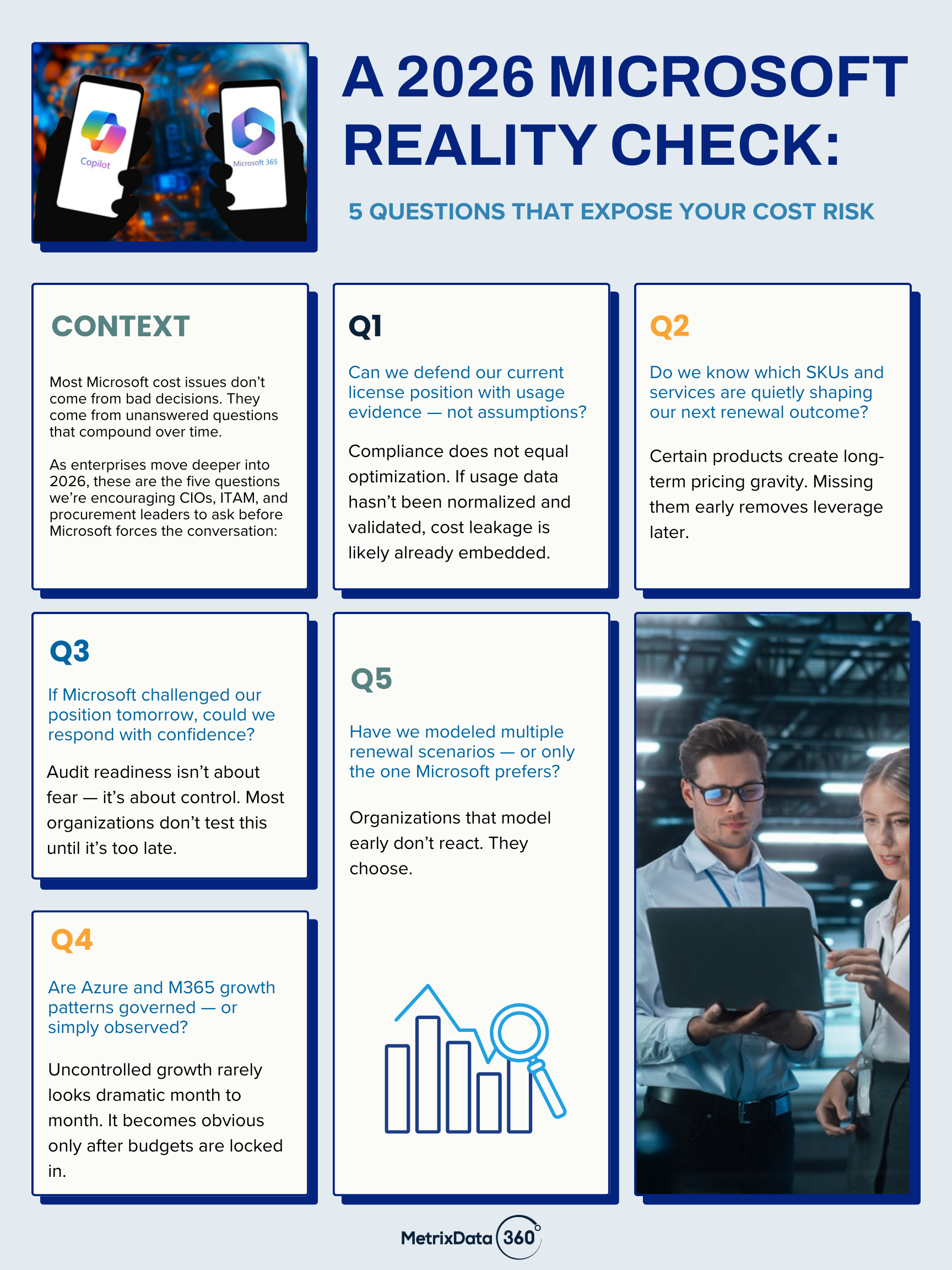
Microsoft Licensing and Cost Control: Five Questions to Answer Now

Most Microsoft cost overruns don’t come from bad decisions. They come from questions that go unasked — until Microsoft asks them first.

As enterprises move through 2026, Microsoft licensing, cloud spend, and renewal outcomes are being shaped long before formal negotiations begin. Usage signals, SKU decisions, governance gaps, and untested assumptions quietly compound — often without triggering alarms internally.

This infographic outlines five questions CIOs, ITAM, and procurement leaders should be able to answer with confidence. Not as a theoretical exercise, but as a practical checkpoint for cost control, audit readiness, and renewal leverage.

Organizations that can answer these questions don’t scramble at renewal — they direct the conversation.
Those that can’t are often forced into decisions under time pressure, incomplete data, and one-sided assumptions.

This is the inflection point where many enterprises engage MetrixData 360 — not because something has gone wrong yet, but because they want to ensure it doesn’t.

If even one of these questions gives you pause, let’s connect.

Microsoft Costs: Why Guessing Is No Longer an Option

Microsoft licensing and cloud spend have crossed a line. In 2026, the difference between controlled and exposed enterprises won’t come down to intent — it will come down to data, timing, and leverage.

At MetrixData 360, we’re seeing a clear pattern across global enterprises: those who treat Microsoft as “business as usual” are absorbing avoidable cost, risk, and pressure — while those who act early are reshaping the outcome entirely.

Below are three signals every CIO, ITAM, and procurement leader should be paying attention to right now.


1. Microsoft Renewals Are No Longer Negotiated — They’re Engineered

The biggest misconception we still see is that Microsoft negotiations start at renewal. They don’t. Pricing outcomes are being shaped 12–36 months in advance — inside usage signals, entitlement drift, contract constructs, and internal governance gaps.

In 2025 alone, we supported enterprises where:

  • License positions looked “clean” — but usage told a different story
  • Contract clauses quietly removed leverage years before renewal
  • Pricing models penalized customers before Microsoft ever entered the room

The takeaway:
By the time renewal arrives, Microsoft already knows your pressure points. Unless you’ve built your position deliberately, you’re negotiating from behind.


2. Visibility Gaps Are Now the #1 Cost Multiplier

Across Microsoft 365, Azure, SQL, and Windows Server, cost overruns are no longer driven by growth — they’re driven by blind spots.

We consistently uncover:

  • Over-entitled SKUs with no operational owner
  • Usage signals that contradict internal assumptions
  • Azure consumption patterns that quietly compound month over month
  • “Compliant” positions that still overspend by double digits

Most organizations don’t have a cost problem. They have a data quality and interpretation problem.

The difference in 2026:
Microsoft has near-perfect visibility. Enterprises that don’t match that visibility are structurally disadvantaged.


3. The Market Is Separating Advisors from Operators

Another shift we’re seeing accelerate: Enterprises are moving away from high-level advisory guidance and toward partners who do the heavy lifting.

In today’s Microsoft environment, value comes from:

  • Normalizing messy entitlement and usage data
  • Translating signals into defensible negotiation positions
  • Modeling scenarios before Microsoft applies pressure
  • Operationalizing controls that persist after renewal

This is why more organizations are treating Microsoft cost optimization as a core operating discipline, not a one-time project.


Where MetrixData 360 Fits In

Enterprises don’t come to us for opinions. They come to us when Microsoft outcomes matter. Our Microsoft services are built for organizations that:

  • Can’t afford surprises at renewal or audit
  • Need defensible, data-backed positions
  • Want leverage — not hope — in negotiations
  • Require operational depth, not surface-level advice

If Microsoft represents a material portion of your IT spend in 2026, this isn’t optional expertise anymore.


If you’d like to pressure-test your Microsoft position — before Microsoft does — we should talk.